Welcome to APU from the IT Team! Our goal is to provide the APU Community with the best technology experience possible. Here is a list of items that may be helpful as you begin your role here at APU. This Guide is useful for Faculty/Staff/Adjuncts that just want to make sure they have all the links and forms they might need!
Important Forms
- Computer Request Form (Regular, Full Time Employee)
- Dialpad Request Form (Full Time Employee)
- Equipment Request Form
- PeopleSoft Request Form
- Additional Forms
Important Websites
- home.apu.edu (Our University Portal/Dashboard)
- Click “Sign In”
- Login with your APU NetID & Password
- If you have not gotten an email to set/reset a password, please email [email protected] and provide your 9-digit APU ID number (Provided by HR)
- Once you are logged in, you will be able to:
- Update Contact Info
- Access Gmail & Canvas
- Submit a Work Order
- inside.apu.edu
- This is APU’s internal portal for APU full-time employees, designed to be your central hub for employee resources as you support students and collaborate across the university.
- Here you can:
- Access forms, policies, resources, and training tools using the menu or search feature.
- hrtotalaccess.apu.edu (Tons of Resources for Employees)
- Here you are able to:
- Search for Employees
- Find Employee’s Extensions
- Find Links & Forms
- View Policies & Find Other Resources Provided by HR
- timekeeping.apu.edu (Timecards)
- Email [email protected] with Timecard questions or for additional support!
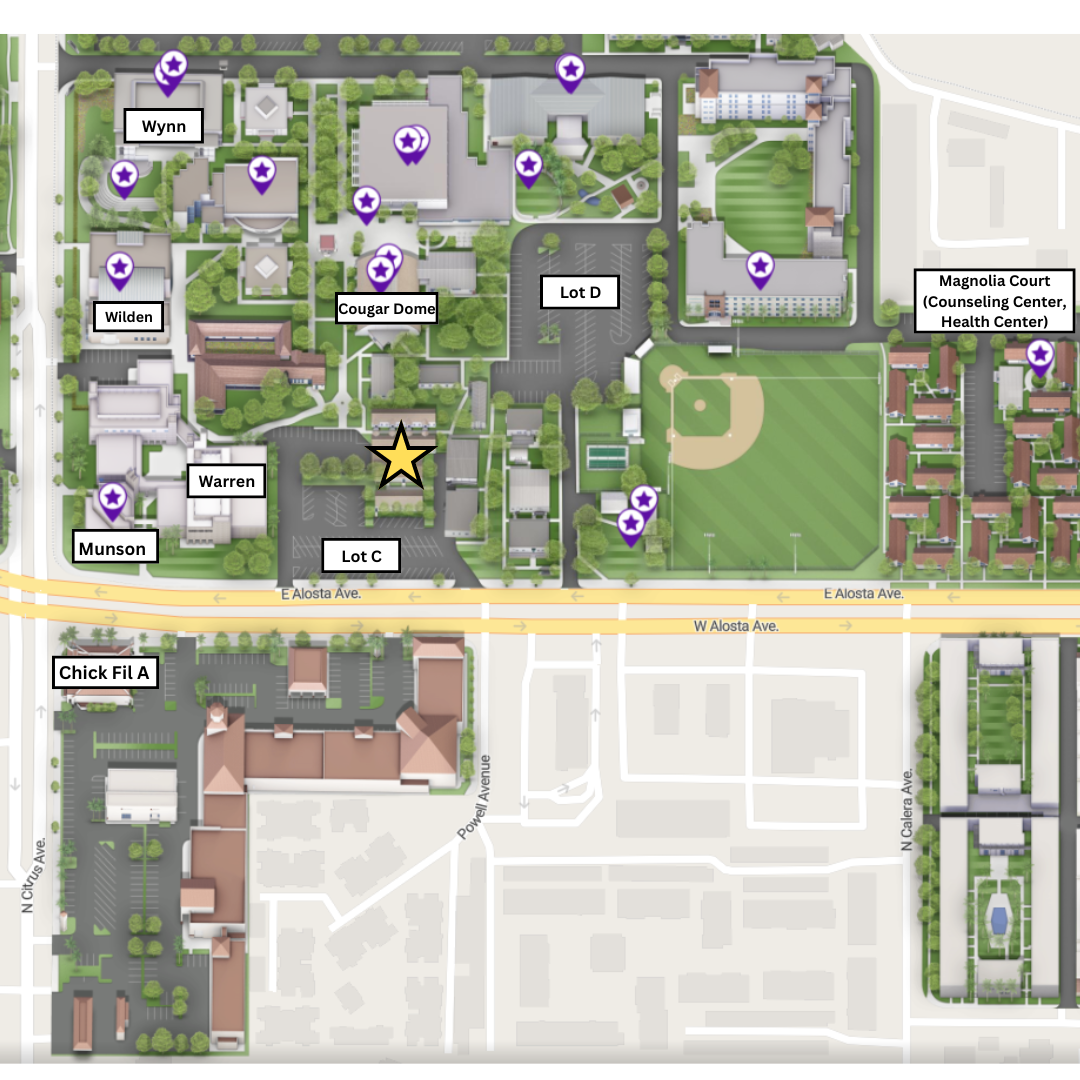
- map.apu.edu
- APU’s interactive campus map, designed to help you navigate the university’s locations and facilities.
- View detailed maps of campus buildings and surrounding areas
- Search for specific buildings, departments, or points of interest
- Explore campus layouts to better understand where services and resources are located
- It’s especially useful for quickly finding where you need to go, whether you're on campus or planning ahead.
FAQ’s
- How Do You Connect to APU Wifi?
- What is Cougar Lock?
- Downloads
- Fortinet VPN (Working Remote)
- Microsoft Applications are only available on APU-Issued Computers (Not for personal devices)
- SPSS
- Facilities Key Requests (Please ask your supervisor as this may not be necessary)
- Access to Facilities/Lockouts
- Generate a Professional APU Email Signature
- APU Mobile Features:
- News
- Campus Map
- Virtual ID Card
- Trolley Tracker
- Campus Dining
- Course Catalog
For Full Time & Adjunct Faculty
Canvas is APU’s official learning management system (LMS). See below for some helpful links to get you started!
- Canvas: Beginning and End of Course Checklists
- APU Canvas Articles
- Publishing Your Course
- Classroom Technology Guides
If you have any Canvas questions, feel free to email [email protected] for additional support!
How to Reach the IT Support Center!
Phone: (626) 815-5050
- Live Phone Support 24/7
- Please note that certain times are handled by a third party service
Email: [email protected]
Website: support.apu.edu
- Helpful Articles & Guides
In Person:
- Please email us at [email protected] for our current hours as it may vary from Semester to Semester
- Typically we are open M-F from 8am-5pm for Walk In
- We are located on East Campus in Building 5 near Parking Lot C