

There are two ways to access your APU email. Both work for students, faculty, staff, and alumni.
Option 1: Through the APU Dashboard (Recommended)
1. Go to home.apu.edu
Sign in with your APU credentials if prompted.
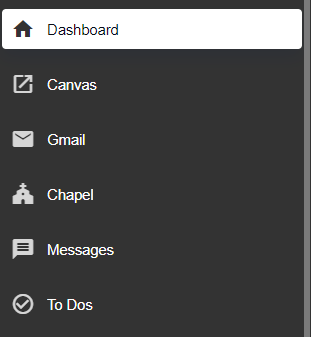
2. Click Gmail on the left side of the dashboard
You will be taken directly to your APU Gmail inbox.
Option 2: Direct Access
You can also access your APU email by going directly to mail.apu.edu. This is a useful alternative if the home portal is unavailable.
You can also visit gmail.com and enter your full APU email address — you will be automatically redirected to the APU login page.
What you’ll need to sign in:
- APU NetID — the first part of your APU email address before the
@apu.edu - Password
- 6-digit authentication code (multi-factor authentication)
If you have trouble signing in or accessing your email, contact us at [email protected] or call (626) 815-5050.